6.1. Selection of Beta
An appropriate choice of the ADMM/LADMM parameter (defined as beta in this software) is important for fast convergence. We have provided functionality to help users compare the convergence speed for different beta values over small portions of the image, so that an appropriate choice can be made quickly and efficiently, prior to estimating the full image. To use this tool, the user needs to create a spatial mask in spatmaskfile format defining a small image patch, and then run the following command.
plot_beta_sweep.sh -imgfile imgfile_name -spect_infofile spect_infofile_name -configfile configfile_name -spatmaskfile spatmaskfile_name -outprefix outprefix_name
plot_beta_sweep('imgfile','____', 'spect_infofile', '____','configfile','____','spatmaskfile','____','outprefix','____',)
Note
This command chooses beta values based on the
solver.betavalue present in theconfigfile. Then, thebetavalues chosen are \([0.01\;0.1\; 1\; 10\; 100] \times\)solver.beta.
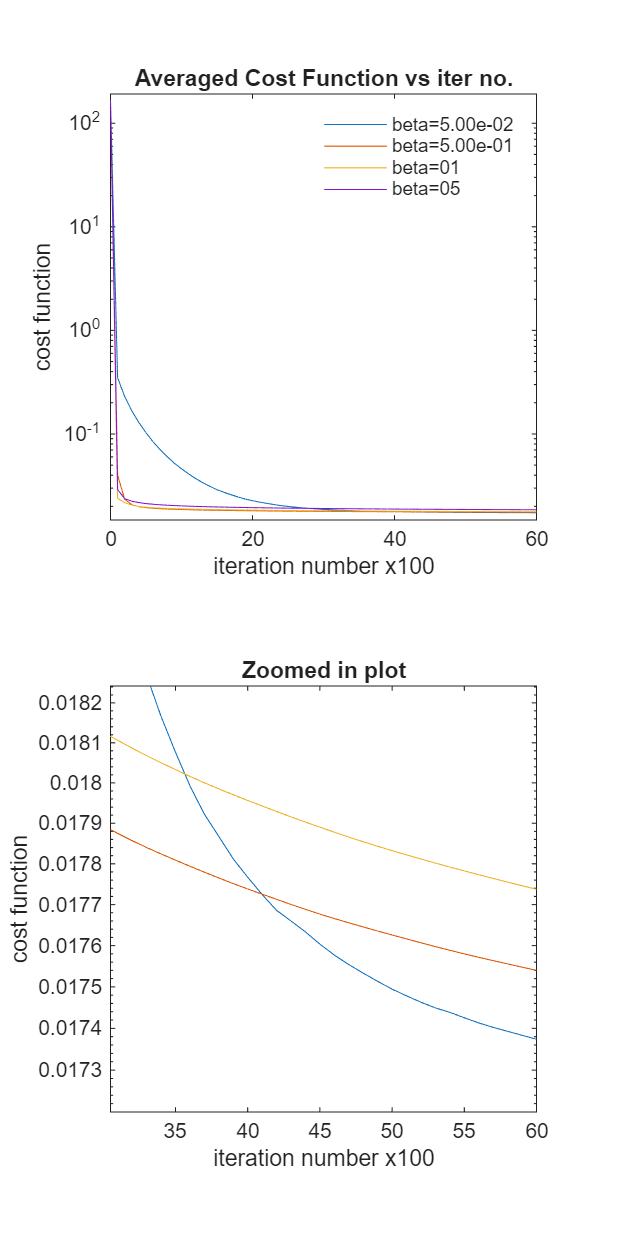
This command saves out a figure in .png format showing the convergence speed and a zoomed out version of it. Below is an example output.
The user can also input the following optional argument with user defined beta values and file types of the stored figure.
plot_beta_sweep.sh -imgfile imgfile_name -betafile betafile_name -spect_infofile spect_infofile_name -configfile configfile_name -spatmaskfile spatmaskfile_name -outprefix outprefix_name -file_types file_types_names
plot_beta_sweep('imgfile','____','betafile','____', 'spect_infofile', '____','configfile','____','spatmaskfile','____','outprefix','____','file_types', '____')
6.1.1. Required Inputs
imgfile:
Filename of the
.matfile storing the MR data related information. Details of the file format can be found here. The user must create this file before proceeding withbetaparameter calculation.spect_infofile:
Filename of the
.matfile containing spectrum-related information. The user needs to create this file based on user selected spectral points and should follow the fileformat mentioned here. This tool can handle multiple spectral dimension (including 1D spectra) as long as this file is stored in the given format.configfile:
Filename of the
.inifile storing spectrum estimation algorithm parameters. The spectrum estimation can be done using three algorithms -LADMM, ADMM, NNLS. The file format is described here.spatmaskfile:
Filename of the
.matfile storing the binary spatial mask for the MR input data. This specifies voxel locations where spectrum estimation would be done for multiple beta values. The spatial dimension of the variable in this file must match with the spatial dimension of the input data. See here for file format.
Note
As the spectrum estimation algorithm with multiple beta values may take long time to run if whole MR volume is chosen, its advised to create the spatial mask as multiple \(3\times3\) patches of voxels per slice. Also its best to choose the patched in location where the most partial voluming occurs. The user can use our GUI based patch selection tool.
outprefix:
A string input for the filename where the output of the beta calculation tool will be stored. By default it saves a
.pngfile. It stores two images in one image file- first image show the cost function vs iteration number for multiple beta values. The number of iteration depends on when thesolver.tolorsolver.numiteris reached. The seconf image shows a zoomed in version of the same image, but the x axis is chosen to show values from the halfway to the final number of iterations and y axis is chosen \([0.99*min_c\; 1.05*min_c]\) , where \(min_c\) is the minimum of all the cost functions.
6.1.2. Optional Inputs
betafile:
This is a
.txtfile containing thebetavalues. This file should be written in the format mentioned below and the variable name should always bebeta_valsin the.txtfile.beta_vals= [0.05 0.5 1 5];
file_types:
This is an optional input where user can spacify the file types of the final stored image. The input must be a
char,string,cellstrorstring array. Available file_types:fig,m,eps,epsc,ai,pdf,bmp,jpg,jpeg,png,tif,tiff. Default:png. Invalid entries are ignored; if all are invalid, falls back topng